I built the one tool my studio needed. Now it's becoming a product.
Millstream is the shared workspace where your team, your clients, and the studios you collaborate with work from the same projects, files, and conversations. It started life as 'Maximized Portal', the internal tool that ran my studio. Today it's a multi-tenant product in closed beta at millstream.app.
The problem
Running a studio means managing clients, projects, tickets, time, trips, and content. I was doing all of that across a patchwork of tools, and everyone I worked with saw a different copy of the truth.
Tools everywhere, nothing connected
Client info lived in a spreadsheet. Tasks in Jira. Notes in Notion. Time tracking in yet another app. Every tool had its own login, its own data silo, its own way of doing things.
Manual tracking between systems
Logging time against a ticket meant cross-referencing three apps. Billing a client meant pulling data from five places. Nothing linked to anything else.
Everyone on a different copy
Briefs sat in email. Feedback was split across DMs and comment threads. When a client asked for a status update, I had to piece it together from scattered tools. No one place told the full story.
The vision
It started simple. I wanted a place where clients could access files, leave feedback, and submit requests, a shared portal between us. Feedback turned into tickets. Tickets needed sprint planning. Sprints needed time tracking. Time tracking needed billing. And suddenly I was building something much bigger.
Millstream grew organically from real needs. Every module exists because the studio needed it, not because a feature list said so. What came out is a workspace where everything connects: a ticket links to a project, which links to a client, and that client carries logged time, trips, files, approvals, and a discussion thread. Everything is one click away, for everyone you choose to share it with.
The dashboard
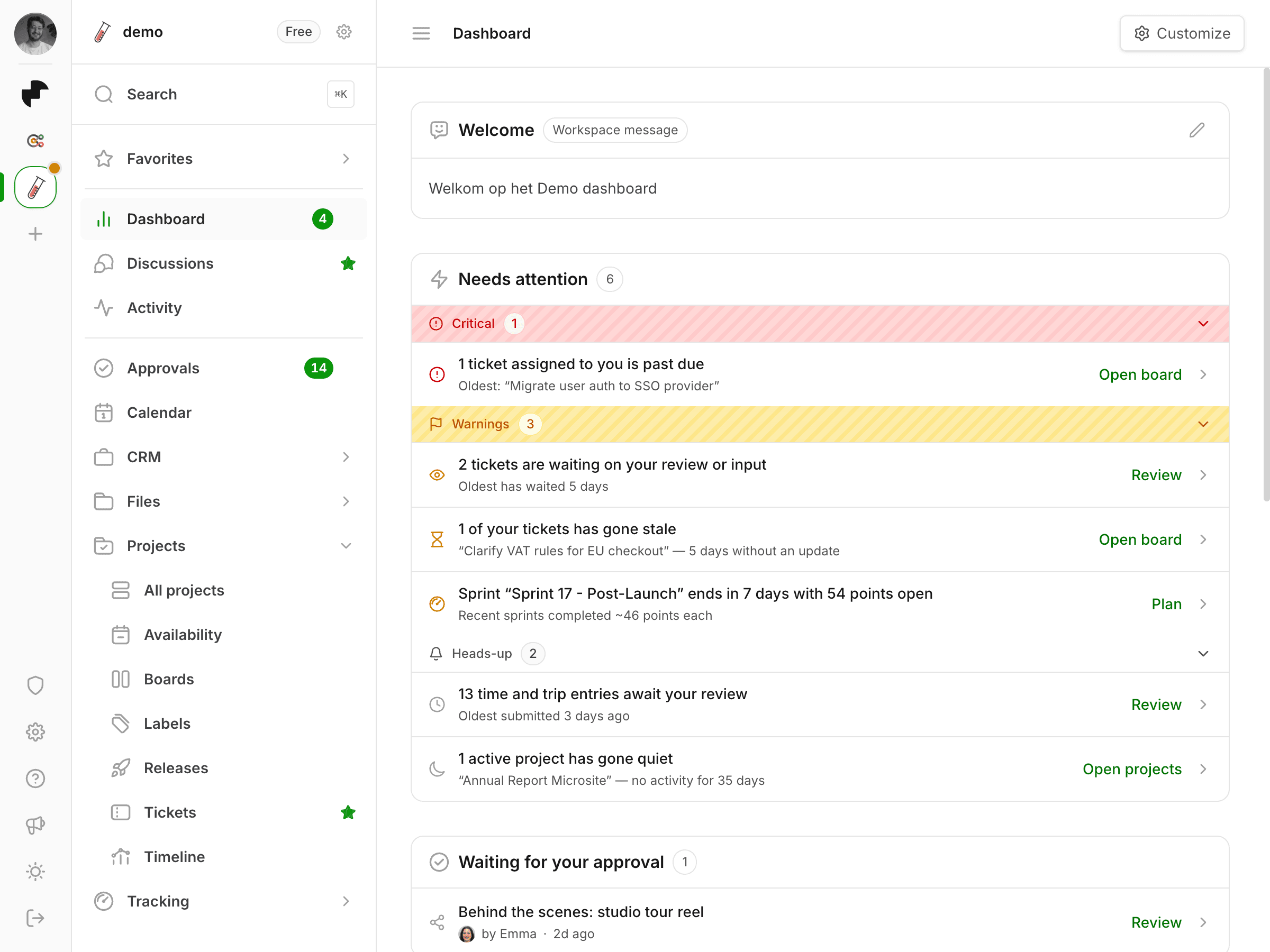
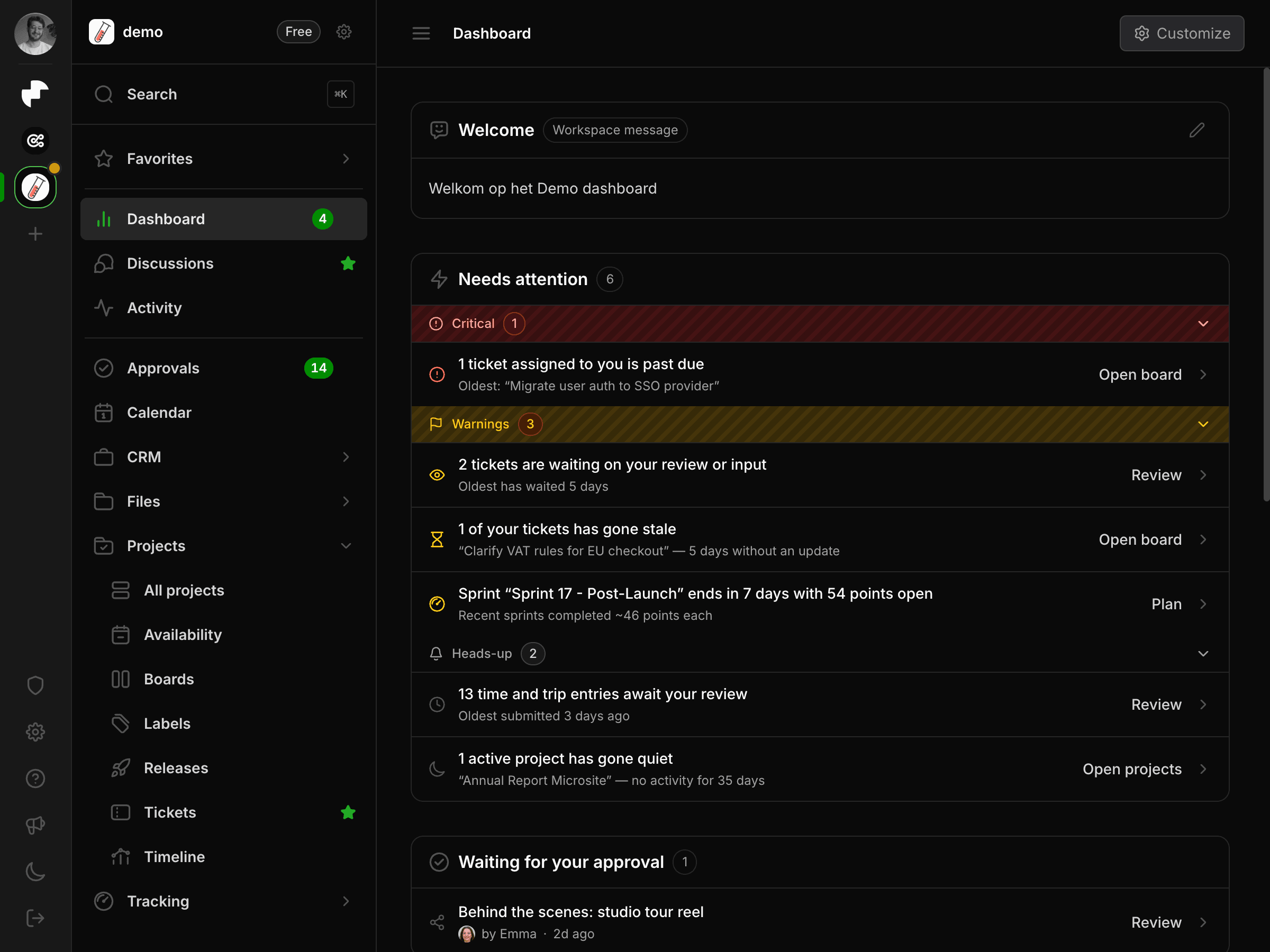
Most tools open on a list and leave you to work out what matters. Millstream opens on what needs you. A set of rules reads the workspace on every load and turns raw state into a short, ranked feed: what is overdue, what is waiting on your review, what has quietly gone stale.
Needs attention, ranked
Findings are grouped into critical, warnings, and heads-up, each collapsible with its own count. An overdue ticket, a card with no update in five days, a sprint that won't fit its remaining points, a project quiet for a month. Every row links straight to the place you fix it.
A grid you arrange yourself
Widgets can be resized, reordered, and switched off. Only the widgets you keep fetch data, and those queries run in parallel, so a trimmed dashboard is also a faster one.
Approvals that surface themselves
File sign-offs, time entries, and trips waiting on you appear on the dashboard instead of sitting in a queue you have to remember to open.
Live workspace activity
A shared feed of everything that changed, so you can pick a project back up without asking anyone what happened while you were away.
Tickets, sprints and releases
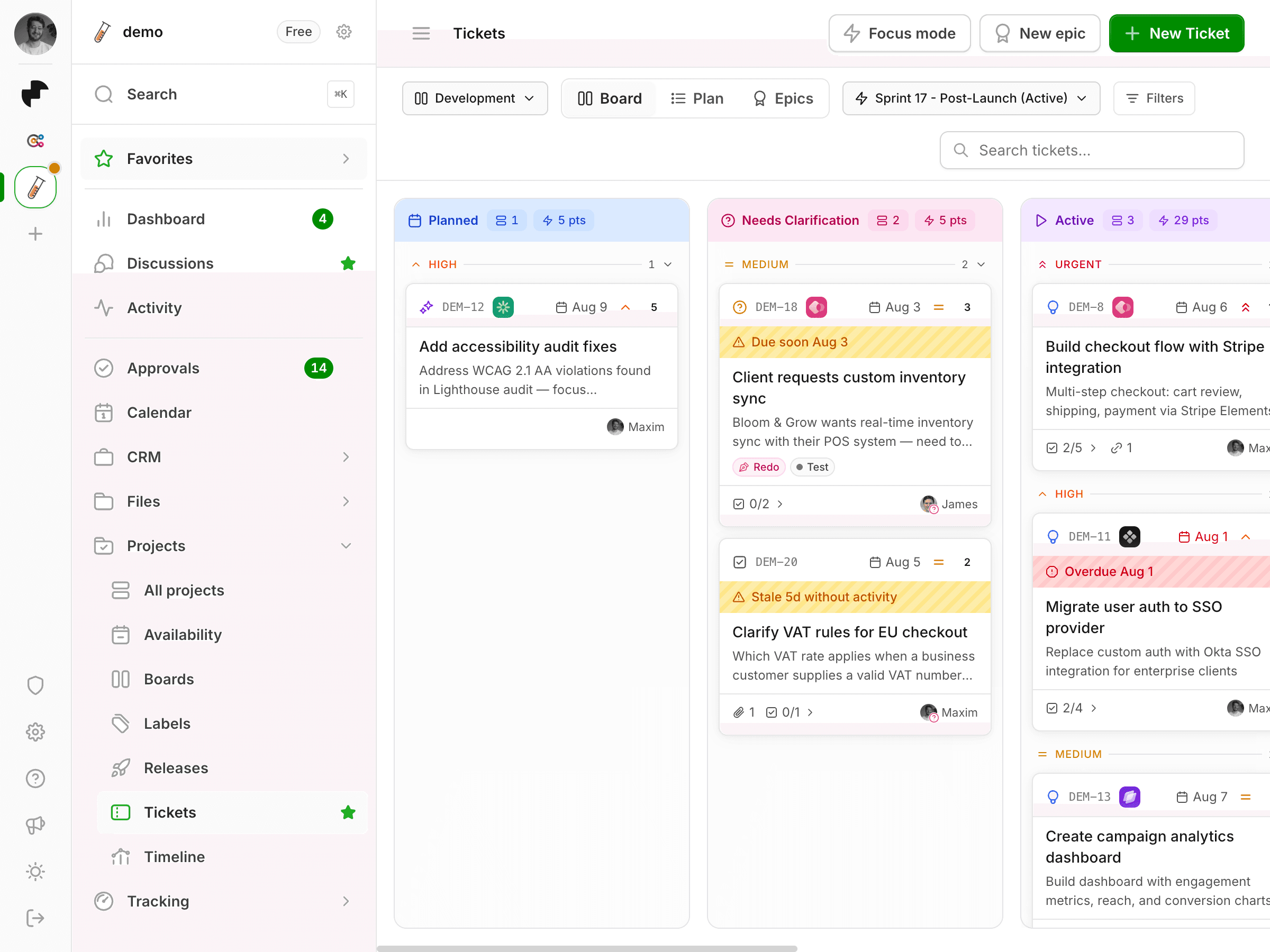
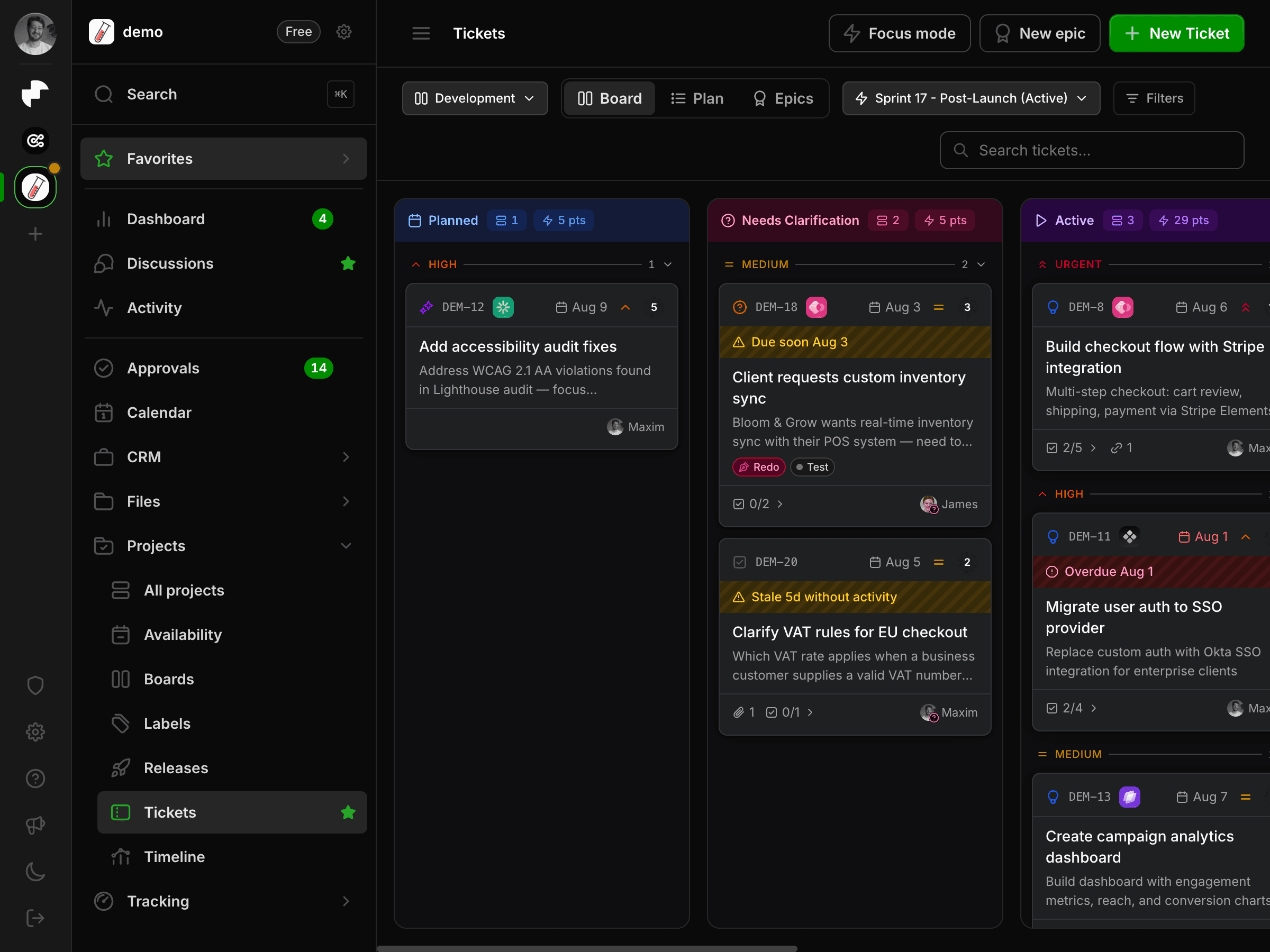
Client feedback becomes a ticket. Tickets live on a board you shape yourself, because lanes, labels, and colors are per workspace rather than baked in. From there they roll up into sprints, epics, and releases, and since every ticket links to a project and a client, moving one card forward updates the rest of the system.
Boards you define
Multiple boards per workspace with custom lanes, colors, and stale rules, plus shipped presets to start from. Card order runs on lexorank, so a single drag never renumbers the whole column.
Sprints with real capacity
Point estimates meet team availability. The planner shows what fits, what doesn't, and how the open points compare to what recent sprints actually finished.
Epics and releases
Group tickets into epics for scope and into releases for shipping. Release notes are generated from the tickets that went in.
Focus mode
A keyboard-first view that shows one card at a time, for the days when a board with two hundred tickets is the wrong tool for the job.
CRM
The CRM is the backbone. Every other module connects back to it. Open a client and you see their projects, tickets, logged time, trips, files, events, and conversations in one place, along with the rates that turn all of it into an invoice.
Company management
Track clients with logos, status, and their own hourly rates. Each company is the anchor point for everything else.
Contacts per company
Manage contacts per company with primary contact promotion, so the right person is always one click away.
Three-tier rate system
Billing rates cascade: client default, project override, per-entry override. Flexible without being complicated, and the same pattern covers per-kilometer trip rates.
A timeline of every interaction
Calls, meetings, emails, and events logged per client. The full history of a relationship in one feed.
Built for collaboration
What turned the internal tool into Millstream was one recurring question: why does the client have to email me for this? The answer became the product. One source of truth, shared with the three circles you work with: your team, your clients, and the studios you partner with.
Clients join as external members, and that role is enforced in Postgres through row-level security rather than hidden in the interface. They review files, follow the board, and raise requests, while rates, the CRM, and internal boards stay out of reach. Partner studios and freelancers work alongside you in shared project spaces without getting your whole workspace. And realtime discussions live on every workspace, project, file, and ticket, with mentions and system messages, so feedback lands where the work is.
The newest layer is an AI inbox that watches the work happen. It reads a call summary and proposes a ticket. It sees two hours of commits and proposes a time entry. It notices a proposal went out and suggests moving the deal on. Every suggestion is approve or dismiss, so you stay in control.
Tech stack
Built on the same stack I use for client work. Modern, typed, production-grade.

Next.js
App Router with Server Components, Server Actions, and route handlers.

React
React 19 for the entire interactive UI layer.

Supabase
PostgreSQL, Auth, Storage, Realtime, and Row-Level Security.

Tailwind CSS
Utility-first styling with Tailwind CSS 4, in a light and a dark theme.

Vercel
Hosting, preview deploys, and the cron jobs behind the reminders.
Challenges
The hardest part was never any single feature. It was keeping the whole thing simple while making it flexible enough for other teams.
I built the first version around my own studio's workflow. The moment other teams came on board, every assumption got pressure-tested. Their projects work differently. Their team structure is different. Their permissions need to be different. And their clients should see exactly enough, and nothing more.
The permission model is where that tension showed most. It started as a per-user grid of module checkboxes, which sounded flexible and turned out to be a maintenance problem: every new page needed another checkbox, and nobody could tell you at a glance what a given person could actually see. It collapsed into three roles, admin, team member, and external, enforced in the database through row-level security. Less to configure, far more certainty about who sees what.
Scope was the other constant battle, and subtraction was the harder half of it. Every module connects to everything else, so a "simple" trip feature still needed client linking, project linking, ticket linking, rate calculations, location autocomplete, and permission checks. The social planner was a whole vertical of its own until I dissolved it into parts that already existed: post content moved into the files library, workflow onto a board, review into the generic approvals system. Deleting it made the product smaller and better.
Results
Millstream is live, in daily use, and onboarding its first outside teams. What started as a client feedback tool became the operating system for my studio, and is now becoming one for other studios too.
12 connected modules
Dashboard, discussions, CRM, approvals, files, projects, tickets, releases, timeline, tracking, calendar, and an AI inbox, plus a live activity feed and a command palette over all of it.
Multi-tenant in production
Real workspaces with full data isolation via row-level security, three roles enforced in the database, clients joining as external members, and free and premium tiers.
Daily use, now in closed beta
This isn't a demo. It's the tool that runs my studio every day, and the first teams are now working in it through the closed beta at millstream.app.
Solo end-to-end build
Design, frontend, backend, database schema, RLS policies, AI integration, English and Dutch translations, PWA and push notifications, deployment. All one person.